Reversing in Ghidra SRE
Ghidra SRE is used as the primary reverse engineering platform. All instructions and tools presented on the site are designed to work with Ghidra.
This guide will help you dive into the world of reverse engineering in just a few steps.
The official version of Ghidra cannot handle far-pointers correctly. You must use the patched version of Ghidra when working with E-GOLD firmware.
What to do before you start
-
Install the patched version of Ghidra.
-
Install C166 support for Ghidra. You can do this in
File -> Install Extensions -
Obtain a fullflash from the phone.
-
Dump RAM and SRAM from your phone.
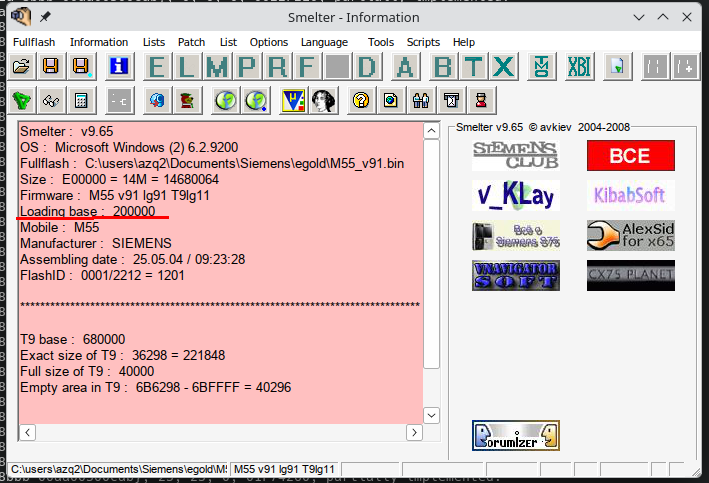
Step 1: Find out the load base of your fullfhash
You can do this using Smelter.
Details
Step 2: Install our plugins for Ghidra
Details
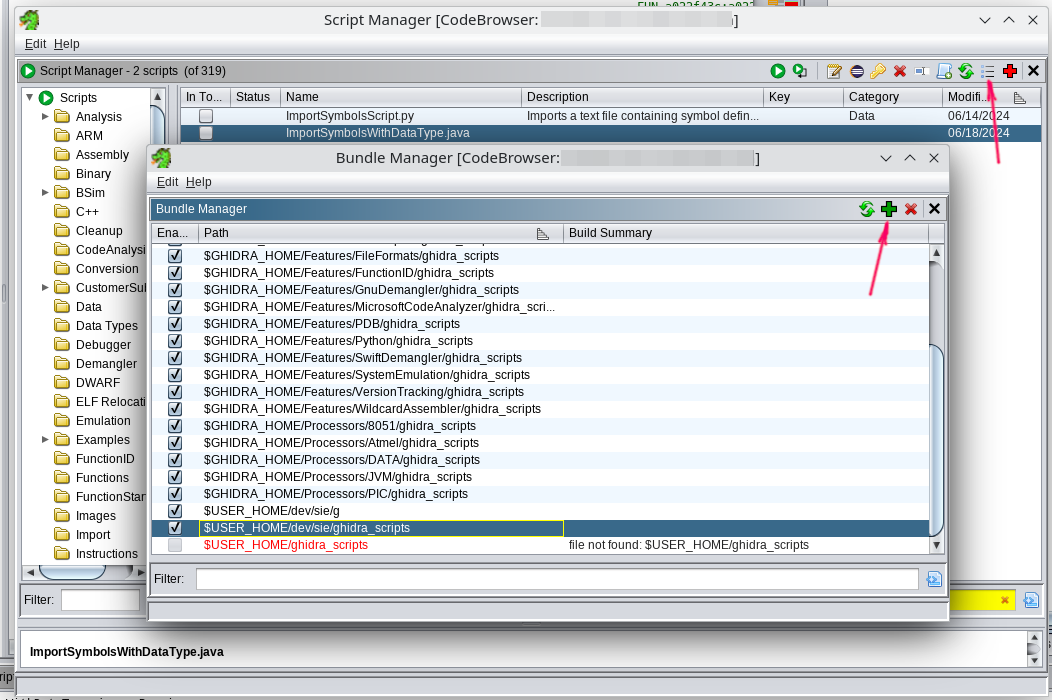
- Download: ghidra_scripts.zip or clone the repository
- Open
Window -> Script Manager - Click "Manage Script Directories"
- Add the path to the extracted
ghidra_scriptsfolder.
Step 3: Load your fullflash.bin into Ghidra
Details
-
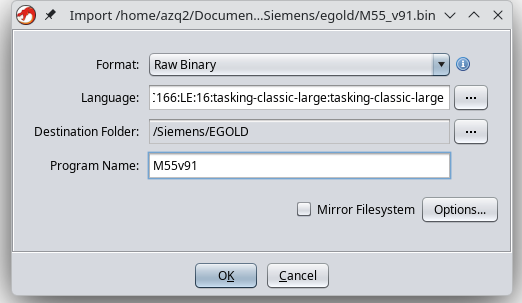
Launch the disassembler and select
File -> Import File -
Select the
fullflash.binfile -
Configure the import parameters:
- Format:
Raw Binary - Language:
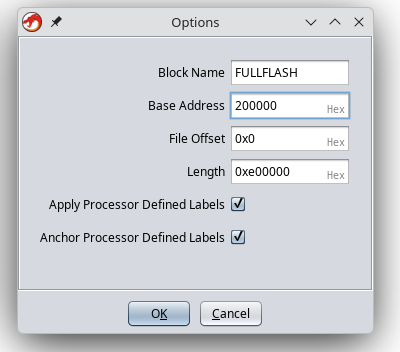
Infineon C167CR TASKING Classic large - Options → Block Name:
FULLFLASH - Options → Base Address:
200000(enter the address shown in Smelter here)
- Format:
-
Click
fullflash.binin the project list. -
Ghidra will offer automatic analysis; you need to decline (click No).
Step 4: Edit the FULLFLASH region attributes
Go to Window -> Memory Map and set the attributes for the "FULLFLASH" block:
 R   W   X    Volatile
[x] [ ] [x]     [ ]
It is very important to clear the W checkbox, as this directly affects decompilation.
Step 5: Remove unnecessary memory regions
- Go to
Window -> Memory Map - Remove XRAM, CAN, IRAM
Do not touch the others.
Step 6: Configure auto-analysis parameters
-
Select
Analysis -> Auto Analyse -
Change the analysis parameters:
Disable:
-
Embedded media -
Non-returning functions - discovered(otherwise the disassembler may stop prematurely inside a function) -
Demangler GNU
Enable:
-
Scalar operand references -
Shared return callswith the[x] Allow conditional jumpsoption
-
-
Click "APPLY", but DO NOT CLICK "ANALYZE"!!!
-
Close the analysis window.
Step 7: Import the previously saved RAM
Example for M55:
-
File -> Add to Program -
Select the file, for example:
M55v91_RAM.bin -
Specify the parameters:
- Block Name:
RAM - Base Addr:
0x000000 [x]Overlay
Click "OK".
- Block Name:
-
Go to
Window -> Memory Mapand set the attributes for the "RAM" block:R W X Volatile[x] [x] [x] [ ]
Step 8: Find any code
Usually it is enough to go to 0x0 or 0x800000 (depending on the firmware), then press D (decompilation).
Step 9: Auto-analyze the firmware
Full analysis
- Open
Analysis -> Auto Analyse 'fullflash.bin' - Make sure the parameters match those specified in Step 3
- Click ANALYSE
This will take 10-30 minutes. The process is long, so be patient.
Congratulations, you did it! ✨
We are waiting for your patches in the patch database patches.kibab.com :)