SiMoCo
Homepage: http://www.mysiemens.cz/ms/simoco/ (web archive)
Forum thread: https://www.siemensmania.cz/forum/viewtopic.php?t=1018
Author: Ing. Pavel Cibulka
Platforms: x10/x25 (HIGOLD), x35/x45/x55 (EGOLD), x65/x75 (SGOLD)
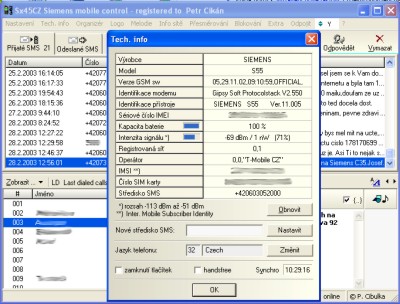
SiMoCo (Siemens Mobile Control, formerly named Sx45CZ) is designed to control Siemens mobile phones from a computer. Supported models include S25, C35(i), M35, S35(i), SL42(i), SL45(i), C45, S45(i), ME45, M50, MT50, C55, S55, SL55, M55, A60, C60, MC60, CF62, C65, M65, CX65, S65, CX70, C75, CX75, M75, and S75. The phone is connected by cable to a serial port or via an IR port that creates a virtual COM port.
Program features:
- View technical information about the phone.
- Manage calls, volume, ringtone, vibration alert, sound, keypad lock, and speakerphone.
- Display the incoming caller number, answer and reject calls.
- View and edit SIM and phone phonebooks, the address book, print, back up and restore, move entries with the mouse, import and export vCard.
- Create and send SMS with selectable encoding, validity period, delivery report, and Flash SMS mode; long messages up to five SMS.
- Send SMS in bulk and save recipient groups.
- View and edit SMS on the SIM card and in phone memory.
- Send and receive EMS: multipart messages, images, animations, and sounds, including on phones without built-in EMS support.
- Automatically archive received and sent SMS, export to CSV, and save message text to a file.
- Notifications for new SMS in a separate window or as an icon in the notification area.
- Access FlexMemory and transfer files between the phone and computer.
- View and edit the organizer and calendar.
- Support for national characters in SMS, phonebooks, the address book, and the organizer using UCS-2 and UTF-8.
- View available and preferred networks, operator information, and edit the preferred networks list.
- Upload logos and startup screens from BMP and GIF files, as well as a logo editor.
- Upload melodies from MIDI files and an iMelody editor with saving to TXT, iMelody, or MIDI.
- Configure call forwarding and call barring.
- Synchronize the phone date and time with the computer.
- Send DTMF signals and strings.
- Remotely control the phone via AT+CKPD.
- Activate the phone service menu.
- View communication between the program and the phone and manually enter AT commands in the terminal window.
Versions
- 2.2.9 — SiMoCo-2.2.9.zip (2007-04-30)
Windows 32-bit · 1.02 MiB
Archived versions (6)
- 2.2.8 — SiMoCo-2.2.8.zip
Windows 32-bit · 968 KiB - 2.2.7a — SiMoCo-2.2.7a.zip
Windows 32-bit · 956 KiB - 2.2.5 — SiMoCo-2.2.5.zip
Windows 32-bit · 939 KiB - 2.2.3 — SiMoCo-2.2.3.zip
Windows 32-bit · 924 KiB - 2.1.6 — SiMoCo-2.1.6.zip
Windows 32-bit · 890 KiB - 2.1.4 — SiMoCo-2.1.4.zip
Windows 32-bit · 868 KiB